
60 credits
$4.9
60 image credits, no expiration
Upload one childhood costume photo. We rebuild it as a movie-poster blockbuster, then walk it back to the truth — same face, same room, one change per slide.
Sign in with Google or email · Photo access expires after 24h
● The Halloween meme everyone's posting this October
No film or TV characters — we swap franchises for an original look-alike: "Snow Queen" instead of Elsa, "Cat-Ear Sweetheart" instead of Hello Kitty.
Credits are charged per set. Choose 2 slides (1 AI image plus your original) or 4 slides (3 AI images plus your original).
| Model | 2 slides · 1 AI image | 4 slides · 3 AI images |
|---|---|---|
| Pro · Nano Banana Pro · 2K | 60 credits | 120 credits |
| image2 · GPT Image 2 · 2K | 45 credits | 90 credits |
| Fast · Nano Banana 2.1 · 1K | 30 credits | 60 credits |
Pack credits do not expire. Subscription credits expire at billing period end without rollover. Failed jobs and blocked generated results restore charged credits automatically; visual imperfections alone do not trigger a refund. View credit packs and subscriptions.
Pay for AI images. Your final original slide uses no credits.
Credits never expire.
$4.9
60 image credits, no expiration
$9.9
132 image credits, no expiration
$29.9
420 image credits, no expiration
$59.9
900 image credits, no expiration
Auto-renews monthly until cancelled. Credits expire at the end of each billing period with no rollover. Cancel at /settings/billing; cancellation takes effect at period end with no further charges.
$7.9 / month
120 credits each month; expire at billing period end
$15.9 / month
288 credits each month; expire at billing period end
$31.9 / month
600 credits each month; expire at billing period end
We rebuild the photo from the truth upwards, one change per slide, with instructions to keep the face and room consistent. Review AI results for mistakes.
The Sorry I Lied trend is a TikTok photo carousel that reveals an untouched childhood costume photo after increasingly modest edits. Slide one is a childhood Halloween photo that looks far too dramatic for what it was. Each slide takes one lie back, and the last one says "I'm so sorry" over the untouched original.
Sorry I Lied works because each small confession brings the cinematic fantasy closer to a familiar family snapshot.
Choose a full-body photo of one child, with the costume clearly visible. Old flash photos, grain and overexposure work well. A face-only close-up cannot tell the whole costume story. Confirm you have permission before uploading.
Leave “Surprise me” selected to let AI choose a fitting costume identity from your photo, or choose the character you thought you were. A homemade princess, a cardboard robot or a supermarket superhero makes the contrast work: the humbler the real costume, the better the reveal.
Choose 2 or 4 slides. We make one fewer AI images than your slide count and keep the original last. Edit captions locally, download 3:4 images, then use the CapCut steps below to assemble your carousel or video. Image output mode for now.
The complete four-slide version is below. Three slides skip the film costume; two slides keep only the poster and original. The last slide is always your real photo.
| Slide order | Default caption |
|---|---|
| 1 | When I was little I was a superhero for Halloween |
| 2 | Ok sorry, it wasn't a movie set |
| 3 | Ok sorry, it was from the store |
| 4 | I'm so sorry |
Original TikTok posts, embedded from their creators. Start with @breeprig0089 above, then explore these photo carousels.
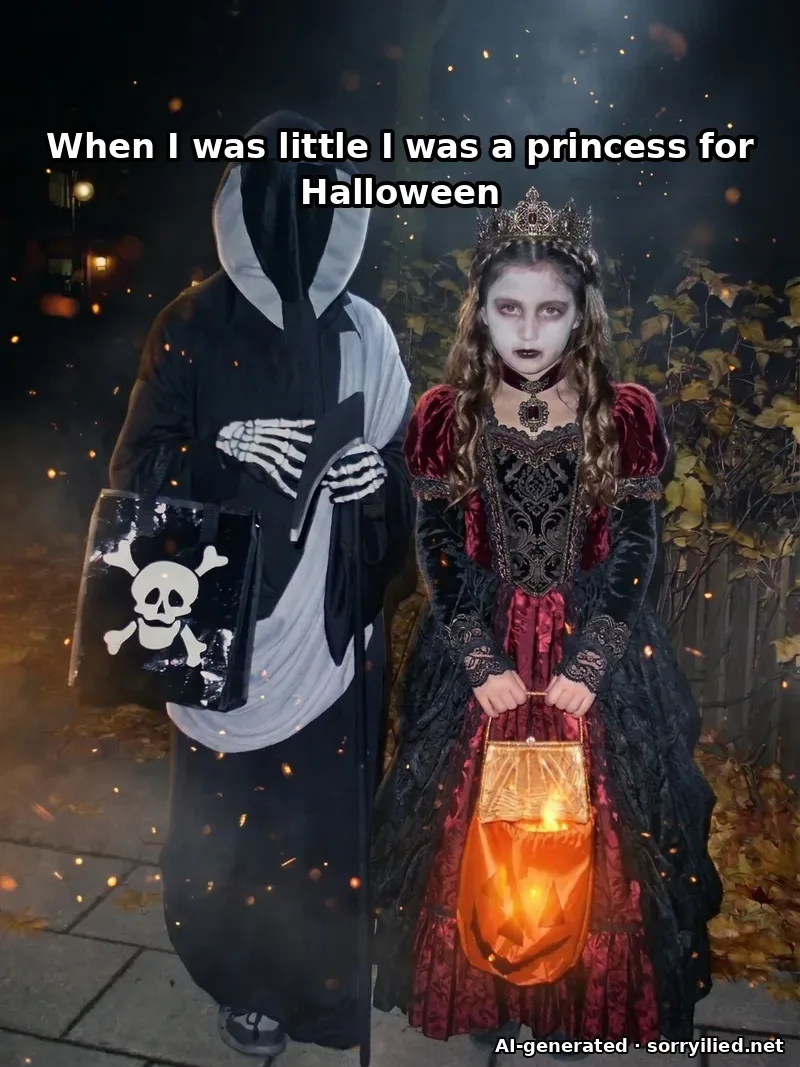
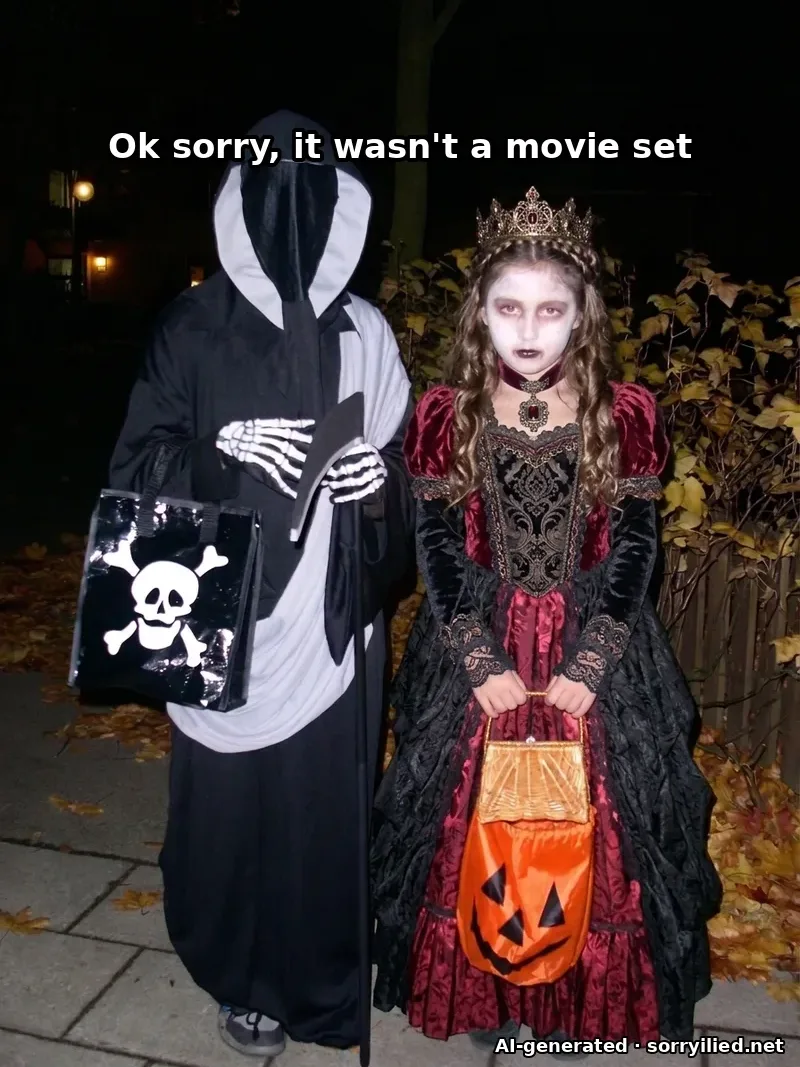
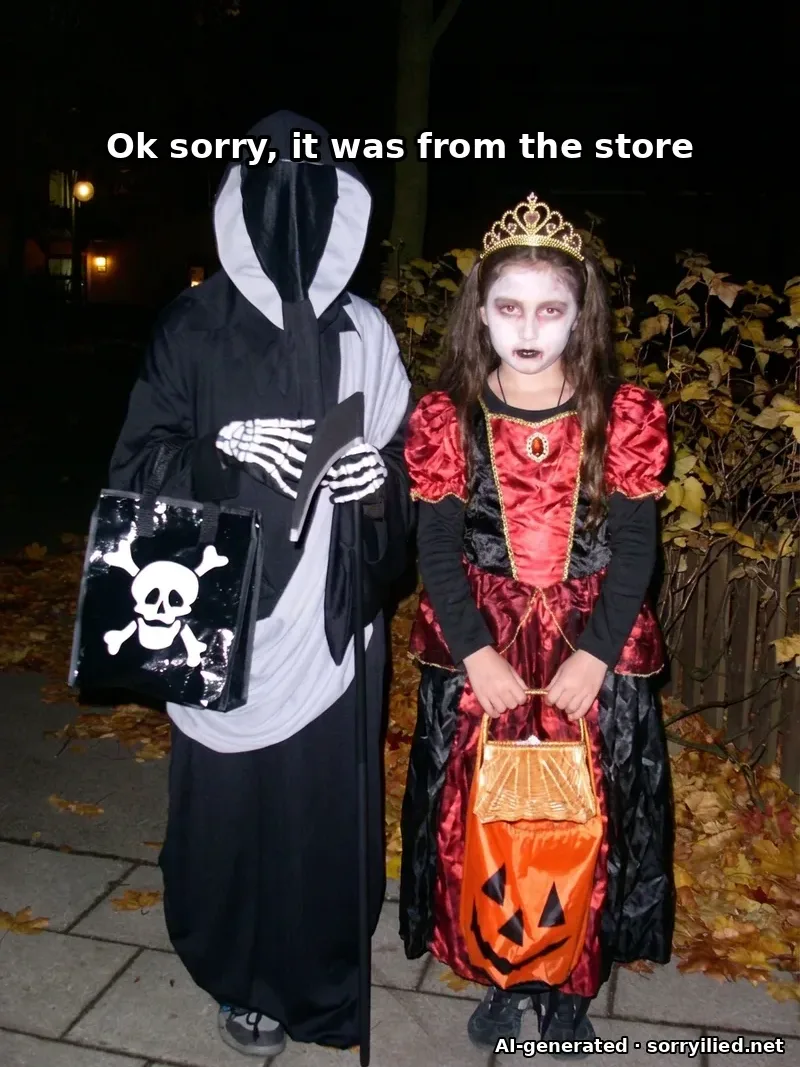
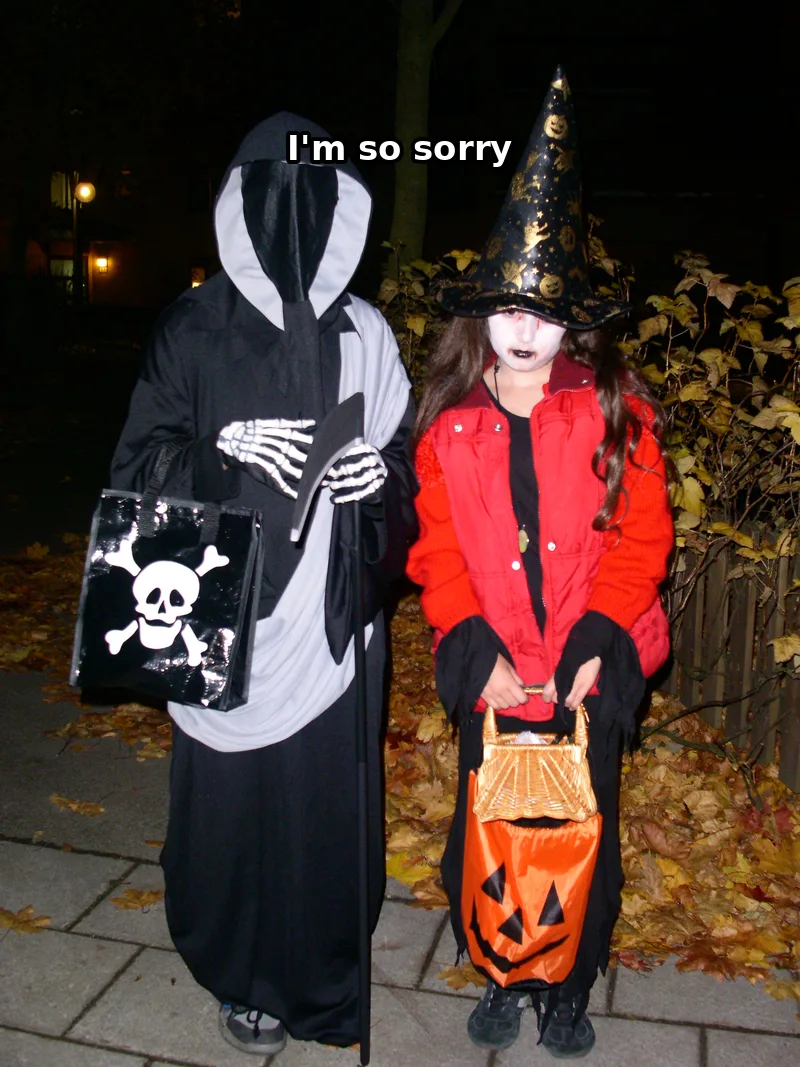
Generated with Sorry I Lied AI. Slides 1–3 are AI-edited (Pro). Slide 4 shows the original photo with an added caption. This demonstration uses a childhood Halloween photo and English captions.
Watch @j.villafuerteee on TikTok The cat-ear costume reveal trades a polished feline look for the childhood outfit behind it.
The cat-ear costume reveal trades a polished feline look for the childhood outfit behind it.
Based on the trend by @j.villafuerteee · TikTok · Request removal
Watch @missysoud on TikTok The ballerina reveal steps back from stage-costume glamour to a childhood dance outfit.
The ballerina reveal steps back from stage-costume glamour to a childhood dance outfit.
Image output mode for now. Use your own manually edited pictures, or the images downloaded here, in this four-step CapCut workflow.
Choose a childhood costume photo you have permission to use. Keep an untouched copy for the final reveal.
Create a project and import your own edited pictures or the downloaded slides. Keep the full 3:4 image visible.
Place the most dramatic image first and the untouched original last. For shorter sets, keep the downloaded slide numbering.
Use audio you have permission to use. Match the final reveal to the beat, preview it, and export your video; you can also post the images directly as a TikTok photo carousel.
This Halloween costume carousel differs from the spoken Starbucks apology-video trend.
Compare the Starbucks apology video (different trend)Your photo, your costume story.
The editing instructions preserve your face shape, expression, age and body size. We ask the model to change the costume, hair and cinematic lighting, without slimming, smoothing or beautifying. AI can still make mistakes, so inspect every result before sharing. The last slide uses your uploaded original photo, with no AI editing.
Credits are charged per set. For 2 or 4 slides, Pro costs 60 or 120 credits, image2 costs 45 or 90, and Fast costs 30 or 60. Pro and image2 use 2K; Fast uses 1K. The final original uses 0 credits. Pack credits do not expire; subscription credits expire at billing period end without rollover. Failed generation jobs and blocked generated results automatically restore the charged credits; successful images with visual imperfections are not automatically refunded. Packs start at $4.9 for 60 credits. This is image output mode; assemble video yourself in CapCut.
Find the costume photo trend in TikTok sounds and choose the sound attached to a childhood costume reveal. Add it when posting your photo carousel, or use audio you are permitted to use in CapCut. We export images, so you choose the music, slide timing and final reveal yourself.
Choose an original costume style instead of a named franchise character. We replace those references with an original look-alike: “Snow Queen” instead of Elsa, for example, or “Cat-Ear Sweetheart” instead of Hello Kitty. The goal is a familiar Halloween costume idea, without copying a studio’s character design, logos or branded artwork.
Yes, if you have permission to process the photo and permission from the child’s parent or guardian where needed. Confirm that permission using the checkbox before uploading. Use your own family photo, not another family’s child or a celebrity’s childhood picture. Photo access expires 24 hours after job creation; background deletion can take longer.
Download all slides, open TikTok’s upload screen and choose Photo. Select the images in their numbered order, keeping the original last. Add the trend’s sound, check each caption and keep the full image visible rather than automatically cropping away the costume. Preview the whole carousel before publishing it to your account.
A Sorry I Lied sequence builds backward from the truth. A four-slide set first makes the cheap store costume, then the tailored film costume, then the cinematic poster lighting. Playback reverses that chain. Each image should still read as the same person in the same room; the last image is the original, rather than a retouched approximation.
This maker uses a childhood costume photo, turns it into a cinematic image and then reveals the original in a carousel; follow the comparison link above for the distinction between the formats and the editing workflow for each before you start editing.
The costume version is tied to Halloween, so it is busiest through Halloween week and likely to fade afterward. You can still make a family costume carousel later using photos you own or have permission to edit, or explore more Halloween trends below.
Sorry I Lied AI is a generator built around this costume reveal: upload an authorized photo, choose a costume style and get 2 or 4 slides, ending with the original without AI edits. Unlike a general image editor, it supplies the transformation instructions and sequence for you. Its prompts ask the model to preserve the person and room, but AI can still make mistakes.
Sorry I Lied AI requires sign-in and credits for generation. Fast costs 30 credits per two-slide set or 60 per four-slide set. The final original uses 0 credits. Packs start at $4.9 for 60 credits. You can also assemble your own manually edited images using the CapCut guide on this page.
Sorry I Lied AI instructs the model to keep face shape, expression, age, body size, pose and framing while changing costume details and cinematic lighting. That is an instruction, not a guarantee of a perfect likeness. Inspect the results before sharing. Failed jobs and generated images blocked by automated safety checks trigger a credit refund; an imperfect likeness alone does not.
A manual prompt sequence to adapt in an image editor is: 1) “Keep the same person, face, age, pose, room and outfit colors. Make the costume look store-bought.” 2) “Use that result; upgrade only costume materials and tailoring.” 3) “Use that result; add cinematic lighting and atmosphere, without text.” 4) Put the edits in reverse order and end with your untouched original. Sorry I Lied AI supplies its own instructions automatically. Other editors may interpret these prompts differently.
In Sorry I Lied AI, sign in and upload a costume photo you have permission to edit, choose a model and 2 or 4 slides, then generate and review the images. Download the numbered slides and upload them in that order in TikTok Photo mode. The dramatic image goes first and your original goes last. Add your chosen sound in TikTok.
Sorry I Lied AI downloads 3:4 images with editable captions and an AI label on generated slides. It does not export video or audio. Post the images in TikTok Photo mode, or import them into CapCut, choose timing and permitted audio, and export the video there.
Sorry I Lied AI stores uploaded photos and generated images in private Cloudflare R2 storage. Access expires 24 hours after job creation, including signed media links. Cleanup runs hourly at minute 17 to delete expired jobs, steps and their R2 images; the one-day R2 lifecycle is a deletion fallback. Physical deletion can lag. KIE receives temporary image links for generation and Workers AI receives images for safety checks; this does not establish a deletion deadline at those providers. Contact support@sorryilied.net for deletion requests.
Sorry I Lied AI accepts JPEG, PNG and WebP images up to 10 MB, so a scanned photo must first be saved in one of those formats. A clear, full-body photo of one person gives the model more detail to work with; blur can reduce likeness. For a group, prompts target the most central, fully visible child, but mistakes are possible. The workflow is designed around human costume photos and has no dedicated pet mode or guaranteed pet results.
Keep the costume stories going.